
Navigating your Ideali dashboard
Get a quick overview of your Ideali dashboard and learn where to find your campaigns, donations, activity feed, and key settings all in one place.
After logging in, the first thing you see is your dashboard. It is your main control center for managing campaigns, tracking donations and memberships, and accessing all areas of your account.
Top Bar
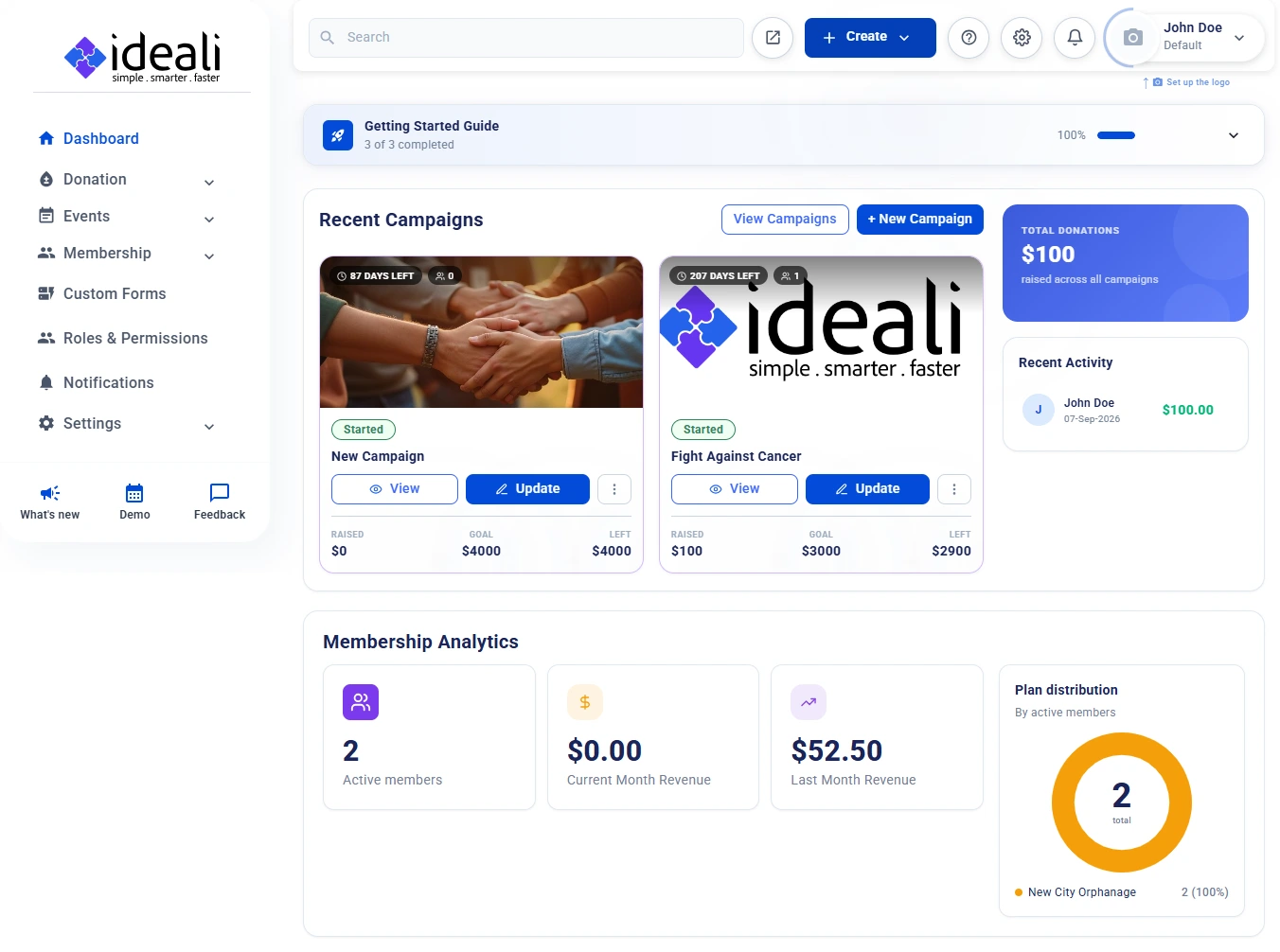
The bar across the top of every page gives you quick access to the tools you use most:
- Search — Find what you are looking for across your account.
- Create — Open the dropdown and choose Donation or Membership to start something new from anywhere in your dashboard.
- Help (question mark icon) — Get help and support.
- Settings (gear icon) — Jump straight to your account settings.
- Notifications (bell icon) — See your latest notifications at a glance. Learn more about notifications.
- Your account — The top right corner shows your name and the sub profile you are currently working in, such as Default. Click the camera icon marked Set up the logo to add your organization’s logo, which also appears in your donor thank you emails.
Getting Started Guide
If you are new to Ideali, the Getting Started Guide at the top of your dashboard walks you through three essential steps to get your account ready:
- Add Payment Account — Connect your Stripe account to start receiving donations.
- Create a Campaign — Set up your campaign with goals and media.
- Publish Campaign — Make your donation campaign live and visible to donors.
The guide shows how many steps you have completed along with a progress bar, so you always know where you left off. Click the arrow on the right to expand or collapse the full list of steps.
Recent Campaigns
The Recent Campaigns section shows your latest campaigns as cards. Each card displays the campaign banner, days left, number of donations, status, and how much has been raised against your goal and how much is left to go.
From each card you can click View to open the public campaign page, Update to edit it, or the three dot menu for more options. Learn more about managing your campaigns.
Use View Campaigns to see your full campaigns list, or New Campaign to start a new one.
Total Donations
The Total Donations card shows the cumulative amount raised across all your campaigns. It updates in real time as donations come in.
Recent Activity
The Recent Activity section displays the latest donations, showing the donor’s name, the date, and the amount, so you can stay on top of incoming support without having to dig through reports.
Membership Analytics
If you run a membership program, the Membership Analytics section gives you a quick view of how it is performing:
- Active Members — The number of members with an active membership.
- Current Month Revenue — Membership revenue received so far this month.
- Last Month Revenue — Membership revenue received last month, so you can compare.
- Plan Distribution — A chart showing how your active members are spread across your membership types.
Sidebar Navigation
The left sidebar gives you access to every part of your account. Items with an arrow open a menu of related pages. To hide the sidebar and give yourself more room, click the panel icon next to the Ideali logo. The sidebar is organized into three sections:
Overview
- Dashboard — Return to this overview at any time.
Manage
- Donation — Manage your fundraising activity, including Campaigns, Payments, Donors, Recurring Donations, and Archived List.
- Membership — Manage your membership program, including Membership Types, Members, Pending Approvals, Payments, Custom Lists, Documents, and Member Alerts.
- Events — Sell tickets and manage registrations, including Events, Sessions, Venues, and Payments. Get started with Events.
- Custom Forms — Build custom forms to collect extra information during membership and event registration.
Administration
- Roles & Permissions — Control what team members can access and manage within your account.
- Notifications — View, search, and manage notifications from the Ideali team and new member registrations.
- Settings — Access Payment Account, Profile Settings, Processor Fees, and Connectors (QuickBooks & Constant Contact) to configure your account and integrate third-party tools.
At the bottom of the sidebar you will also find shortcuts to What’s new, Demo, and Feedback.
Viewing and managing notifications
View, search, and filter notifications from the Ideali team and new member registrations, then mark them as read or delete them from your dashboard.
Ideali keeps you informed through notifications in your Organizer Dashboard. You can view them quickly from the bell icon or see the full list on the Notifications page, where you can search, filter, read, and delete them.
Types of Notifications
- Messages from the Ideali team — Updates sent by Ideali about new features, platform changes, and important announcements.
- New member registrations — An alert each time someone registers for one of your memberships, so you can review and approve pending members without delay.
Quick View from the Bell Icon
Click the bell icon in the top bar of your dashboard to open the notifications panel. It shows your latest notifications at a glance. When you have no new notifications, the panel shows No notifications — You’re all caught up!
The Notifications Page
For the full list, click Notifications in the left sidebar. This page brings together everything the platform has sent you, in one place.
At the top of the page you will see three counters:
- Total — All notifications on your account.
- Unread — Notifications you have not opened yet.
- Read — Notifications you have already opened.
Searching and Filtering
- Use the Search notifications box to find a specific message by keyword.
- Use the filter buttons on the right to switch between All, Unread, and Read notifications.
Reading a Notification
Click any notification in the list to open it and read the full message. Once opened, it moves from Unread to Read and the counters update.
Deleting a Notification
- Go to Notifications in the left sidebar.
- Find the notification you want to remove, using search or the filters if needed.
- Click the Delete icon next to it.
The notification is removed from your list and the counters update.
Notifications vs. Member Alerts
Notifications are messages sent to you. If you want to send updates to your own members, use Member Alerts instead.
Tip: Keep an eye on your Unread count so you don’t miss new member registrations or important updates from Ideali.